
Pricing a Fansbuy order from deposit to refund
Money moves at checkout, at the parcel stage and once more when freight settles. Here is each charge, where it is shown, and what our own checks found.
Separate the item bill from the parcel bill
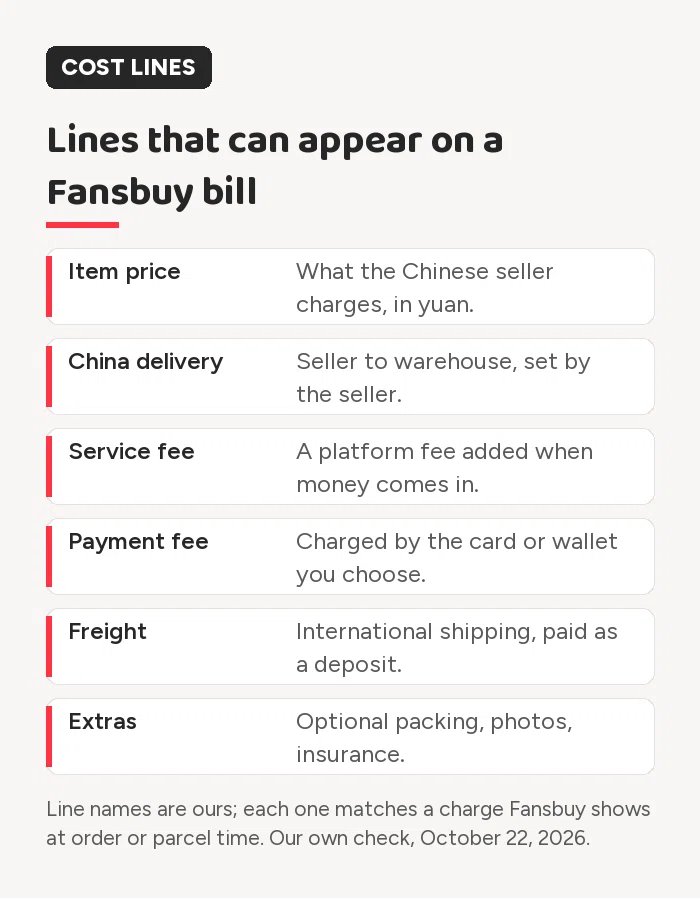
A Fansbuy order is paid in pieces, and the pieces arrive at different moments. At checkout: the item price the seller charges, the seller’s delivery fee to the warehouse, a platform service fee and any fee your payment method adds. At the parcel stage: international freight as a deposit, optional packing extras and optional insurance. Afterwards: either money back to your balance or a shortfall to settle.
Budget example, not a Fansbuy quote: suppose a listing is ¥100 and domestic delivery is ¥10. That ¥110 subtotal does not yet cover payment charges, any displayed platform fee, international freight or optional services. Record each of those separately. When a parcel quote appears, add its deposit once; after packing, replace that deposit with the settled freight rather than counting both as costs. Follow the checkout stage and parcel stage to see where the figures appear.
Most surprises come from the second half. Freight on a heavy or bulky parcel can exceed the price of the items in it, which is why the cost breakdown starts with what you buy, not what you pay for it.
The total you actually pay is therefore only known when the parcel ships, which is why this manual never quotes one all-in price for an order. It explains each line instead, so the bill makes sense when it arrives.
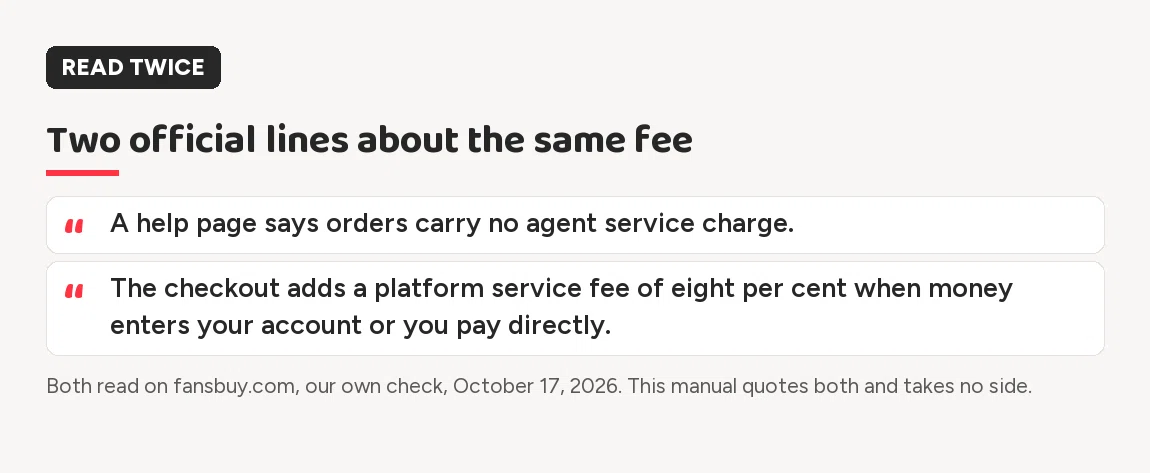
The service fee, worded two ways by Fansbuy
Fansbuy’s help article on service fees says no service fee applies to orders placed on shopping platforms. Its payment screens and public settings, read on October 17 and again on October 22, 2026, add an 8 per cent platform service fee whenever money comes into your account by top-up or you pay an order directly. Paying from an existing balance does not add it a second time, and the withdrawal instructions published in September 2026 refund it in proportion to what you take back out.
This manual quotes both statements and does not pick one. What you can rely on is the checkout itself: the service fee line is shown before you confirm payment.
The exchange rate Fansbuy converts with
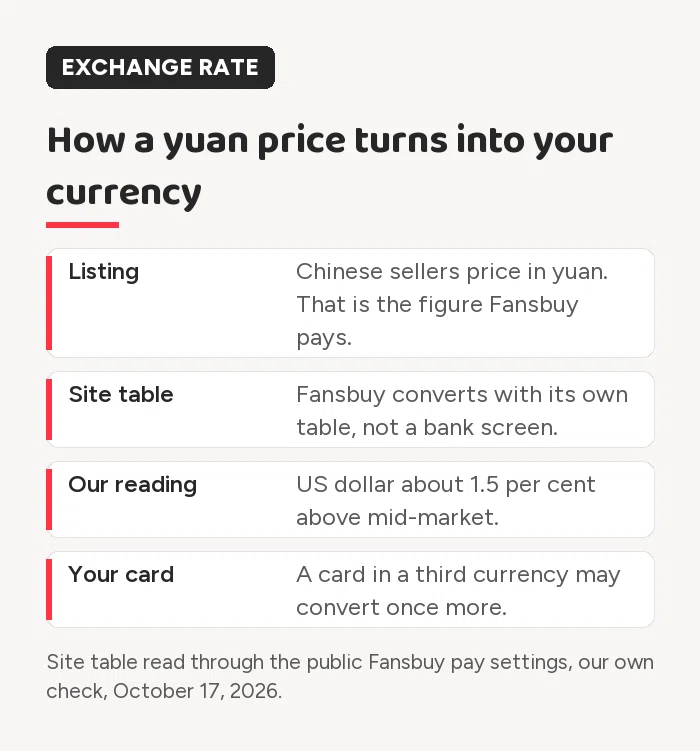
Sellers are paid in yuan, and every figure in your currency on fansbuy.com is a conversion through Fansbuy’s own rate table. That table is not a live market feed. When we compared it with the mid-market rate on October 17, 2026, the US dollar rate sat about 1.5 per cent above mid-market, and the euro and pound were in the same range.
In numbers: on October 17 the site table priced one US dollar at 6.603 yuan, so a 100 yuan listing showed as about $15.14. At that day’s mid-market rate the same 100 yuan was worth about $14.92. Twenty-two cents on a hundred yuan is small on one T-shirt and noticeable on a large haul.
So a listing at 100 yuan costs you a little more than a currency app suggests, before any fee. If you pay with a card in yet another currency, your bank may convert a second time. Paying in the same currency your card uses avoids that second step.
Ways to pay in, and why your list differs from ours
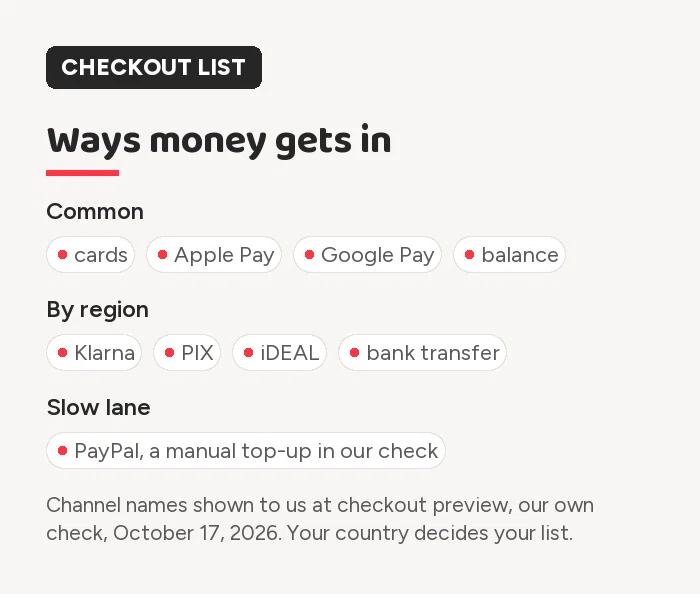
Fansbuy’s top-up article mentions more than 30 payment options. Which ones you see depends on your country: the checkout loads a regional list. Cards, Apple Pay and Google Pay appear widely; Klarna, iDEAL and bank transfers show up for some European countries, and PIX for Brazil. A payment-method fee is added on top and shown before you pay; Fansbuy does not refund it on withdrawal.
PayPal is listed in the help centre at a 4.4 per cent plus 30 cent fee, but in our check it ran as a manual top-up, where you enter your PayPal name and upload a payment screenshot, rather than an instant checkout button. Bank transfers sent on a Sunday or public holiday are credited by hand on the next working day.
Getting money back out of the balance
Refunds for out-of-stock items and freight overpayments land in your Fansbuy balance, not on your card. To move money out, request a withdrawal in Personal Centre. Once approved, it goes back to the original payment method or methods. Fansbuy’s timings: about 2 to 3 business days to a PayPal balance and 3 to 10 business days to a bank card.
Before requesting a withdrawal, distinguish three records: the cancelled order or freight adjustment, the credit in your Fansbuy balance, and the later withdrawal to the original payment method. A balance credit completes only the middle step. If money seems missing, give support the relevant order or parcel reference and ask which of those three records is still pending; the FAQ explains the labels.
Fees on the way in are not returned on the way out, and the payment provider charges a processing fee of roughly two dollars per original transaction refunded. If one withdrawal has to be split across several earlier payments, that fee applies to each. Withdrawing everything in one go after a single top-up is the cheapest pattern.
For questions about a specific charge, see the withdrawal instructions or write to support with the order number.